
Key Takeaways
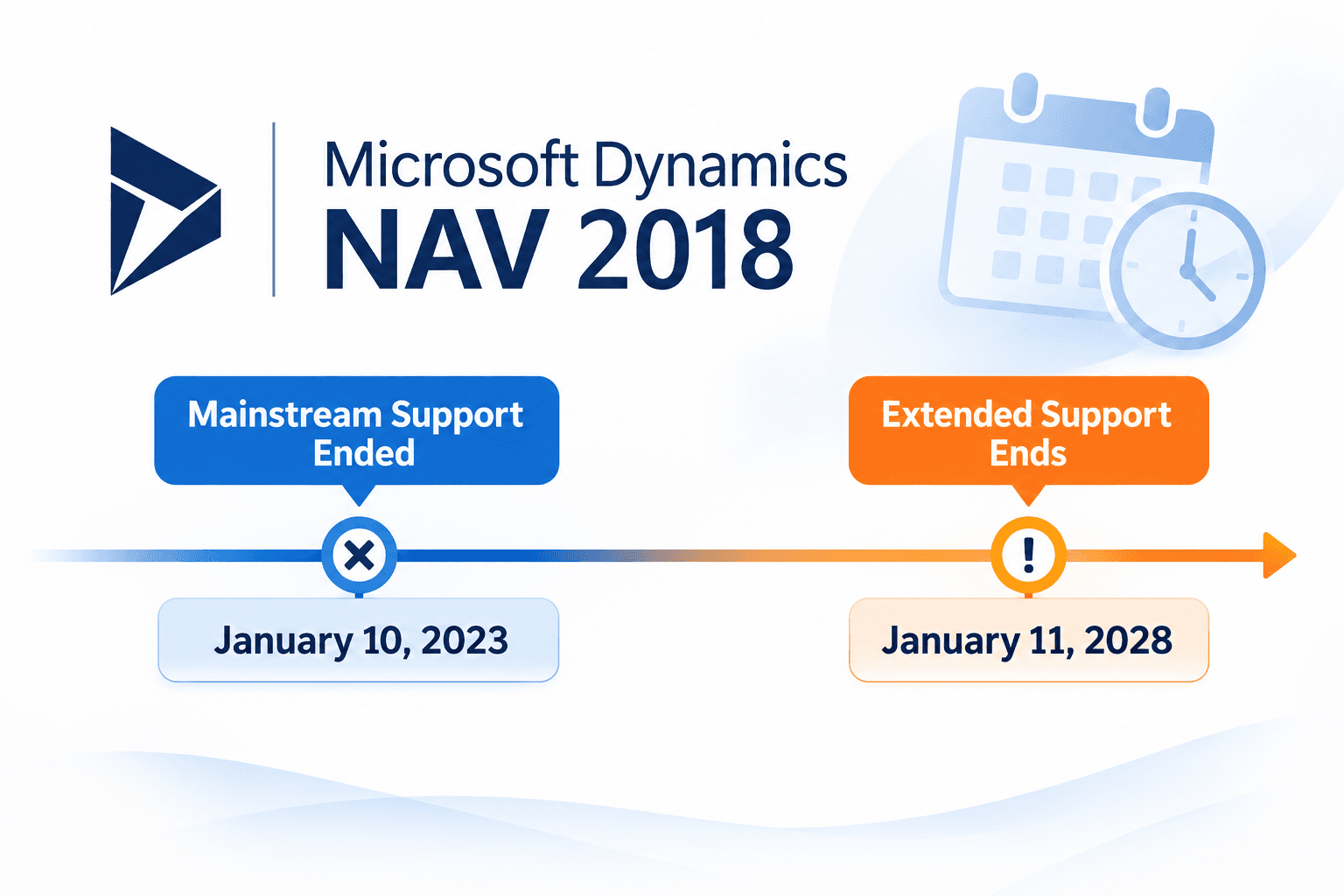
- Know the deadlines: Mainstream support ended on January 10, 2023 and extended support ends on January 11, 2028.
- Understand the risks: Unsupported software can create security, compatibility, and maintenance challenges.
- Evaluate your options: Consider Dynamics 365 Business Central, continued use with appropriate risk controls, or alternative ERP solutions.
- Plan ahead: Assess your current ERP environment, future requirements, and budget to determine the right modernization strategy.
When Is Dynamics NAV 2018 End of Support?
Microsoft Dynamics NAV 2018 has two key support milestones. Mainstream support ended on January 10, 2023, and extended support is scheduled to end on January 11, 2028, according to Microsoft's official lifecycle page.
With mainstream support already ended, businesses should review their ERP strategy before the extended support deadline. Although NAV 2018 will not automatically stop working afterward, organizations should evaluate their long-term security, maintenance, and support requirements.
What Does Dynamics NAV 2018 End of Support Mean for Your Business?
The end of support does not mean Dynamics NAV 2018 will stop working. Businesses can continue using their existing system, but Microsoft will no longer provide the same level of support once extended support ends in January 2028.
Consider this example: A manufacturing company uses NAV 2018 to manage inventory, purchasing, planning and financial reporting. As its business grows, the company adopts new warehouse or logistics software and reporting tools. If compatibility issues arise or a security vulnerability is discovered after extended support ends, the company may need to rely on internal expertise or third-party assistance to address the problem. This could increase maintenance effort and affect business operations.
This is why modernization matters. Assessing the existing ERP environment and evaluating suitable alternatives can help businesses prepare for changing requirements rather than waiting until a critical issue arises.
Risks of Continuing to Use Dynamics NAV 2018
Continuing to use an older ERP system without a clear maintenance strategy can create challenges as technology and business requirements evolve.
Security and compliance
After extended support ends, businesses should not expect regular Microsoft security updates for NAV 2018. This can make managing vulnerabilities and meeting internal security & regulatory requirements more challenging.
Compatibility issues
New operating systems, business applications, and third-party tools may not always work smoothly with an older ERP environment, potentially increasing the effort required to maintain integrations.
Maintenance costs
Legacy customizations and dependence on specialized technical expertise can make troubleshooting and ongoing maintenance more complex over time.
Limited opportunities for modernization
Businesses may find it challenging to adopt newer capabilities in automation, reporting, and cloud-based operations without investing in changes to their existing ERP environment.
These risks will vary depending on each organization's infrastructure, customizations, and security controls. Assessing the current environment can help businesses identify potential issues and determine their next steps before extended support ends.
What Are Your Options Before Dynamics NAV 2018 Support Ends?
With extended support scheduled to end in January 2028, businesses using Dynamics NAV 2018 should evaluate which approach best fits their operational needs, budget, and long-term goals. The right decision depends on the complexity of the existing system and the organization's future requirements.
Option 1: Evaluate Dynamics 365 Business Central
Dynamics 365 Business Central on Cloud is a natural option for organizations looking to modernize their ERP environment. Since both Dynamics NAV and Business Central are Microsoft products, businesses can benefit from continuity within the Microsoft ecosystem. This can make the modernization process more familiar, particularly when evaluating existing business processes, integrations, and Microsoft-based applications.
Business Central also follows Microsoft's user experience principles, offering a familiar interface and working environment for organizations already using Microsoft solutions and platforms. Its integration with services such as Microsoft 365, Power BI and Power Platform can further support connected business operations and productivity.
Security is another important consideration. Business Central incorporates Microsoft's security capabilities, including identity management, access controls, data encryption, and security monitoring. These measures help protect business data and manage access to critical information. Organizations can explore Microsoft's Business Central security documentation to understand its security features and recommended practices.
Beyond traditional ERP functionality, Business Central is also evolving with AI-powered CoPilot features that can simplify everyday tasks and improve user productivity. Learn more about how Copilot AI in Dynamics 365 Business Central transforms ERP usability.
Option 2: Continue Using NAV With a Risk-Management Plan
Businesses may continue using NAV 2018 while preparing for a longer-term decision. However, they should review security controls, maintenance arrangements, and compatibility risks, especially as the end of extended support approaches.
Option 3: Explore Alternative ERP Platforms
Business Central may not suit every organization. Businesses with specialized requirements should also evaluate other ERP platforms based on functionality, integration needs, scalability, licensing, and long-term support.
Dynamics NAV 2018 vs. Dynamics 365 Business Central
| Comparison Areas | Microsoft Dynamics NAV 2018 | Dynamics 365 Business Central |
|---|---|---|
| Platform and Microsoft Ecosystem | An established Microsoft ERP platform designed to manage finance, sales, purchasing, inventory, and other business operations. | The modern successor to Dynamics NAV, built within Microsoft's business application ecosystem and designed to work with Microsoft services and other business applications. |
| Deployment Options | Primarily used in on-premises environments, with businesses managing their own infrastructure and hosting requirements. | Available in both cloud and on-premises deployment models, allowing businesses to select an approach based on their operational and IT requirements. |
| User Experience | Provides NAV's traditional Windows and web client experience, depending on the existing deployment and configuration. | Offers a modern web-based interface with a familiar Microsoft experience, helping existing Microsoft users adapt to the updated platform. |
| Updates and Maintenance | Requires version-specific maintenance, infrastructure management, and planning for applicable updates and fixes. | Business Central online receives regular platform and application updates from Microsoft. On-premises deployments require organizations to manage their own update processes. |
| Customization and Extensibility | Supports legacy customizations developed using C/AL and NAV-specific development approaches. | Uses AL-based extensions and modern development approaches. Existing NAV customizations may require conversion, redesign, or redevelopment before they can be used. |
| Integration and Connectivity | Integrations generally depend on existing connectors, custom development, and the organization's current Microsoft and third-party applications. | Supports integration with Microsoft 365, Power Platform, Power BI, and other business applications through available connectors, APIs, and extensions. |
| Security and Data Protection | Security depends on the organization's infrastructure, access controls, database configuration, and maintenance practices. | Provides Microsoft security capabilities such as Microsoft Entra ID authentication, role-based access controls, data encryption, and auditing, with implementation and configuration requirements varying by deployment model. |
| Reporting and Business Automation | Supports reporting and business workflows through its existing functionality, customizations, and connected tools. | Provides modern reporting and workflow capabilities, with options to extend automation through Power Automate, Power BI, and other Microsoft services. |
| AI and Copilot Capabilities | Does not provide the same native, evolving Copilot experience available in modern Business Central environments. | Offers evolving Copilot and AI-powered capabilities (Agents), subject to product availability, licensing, configuration, and regional support. |
| Support and Product Lifecycle | Extended support is scheduled to end on January 11, 2028. | Follows Microsoft's current Business Central lifecycle and servicing policies, with regular product updates and ongoing platform development. |
Choosing the Right ERP Platform for Your Business
Choosing between continuing with Dynamics NAV and moving to Business Central requires more than comparing features. Businesses should consider their growth plans, operational complexity, reporting requirements, and future technology investments. While Business Central provides a modern Microsoft ERP platform, the decision to move should be based on how well it supports existing business processes and future objectives.
For small and mid-sized businesses, Business Central can also help improve financial visibility, cash flow forecasting, and data-driven decision-making. Explore our article on How D365 Business Central Is Powering the Modern SMB CFO to understand how it supports modern finance teams.
How Synoverge Helps Businesses Modernize Microsoft Dynamics NAV
Modernizing a legacy ERP system requires more than moving to a newer platform. Businesses need to evaluate existing workflows, customizations, integrations, and future requirements before deciding on the right approach. Synoverge Technologies helps organizations explore Microsoft Dynamics solutions aligned with their operational needs and digital transformation goals.
Synoverge's deep experience with Microsoft Dynamics 365 Business Central includes projects focused on ERP implementation, financial process automation, and system integration. For example, in a project for a leading logistics company, Synoverge implemented Business Central to streamline GST compliance, automate financial transactions, and integrate operational data. This demonstrates practical experience delivering Business Central solutions, although each organization's modernization requirements will differ.
For businesses running Dynamics NAV 2018, the next step is to assess the existing ERP environment and determine whether Business Central or another solution is the best fit. Synoverge's Microsoft Dynamics 365 services and legacy modernization and re-engineering capabilities provide relevant starting points for exploring modernization, integration, and long-term scalability.
If your organization is planning its next steps before Dynamics NAV 2018 extended support ends, contact us to discuss your current ERP environment and evaluate suitable modernization options.
Dynamics NAV 2018 End of Support: Your Next-Step Checklist
With Dynamics NAV 2018 extended support scheduled to end in January 11, 2028, businesses should start preparing for their next steps. A structured assessment can help you understand your current ERP environment, identify potential risks, and make informed decisions about modernization.
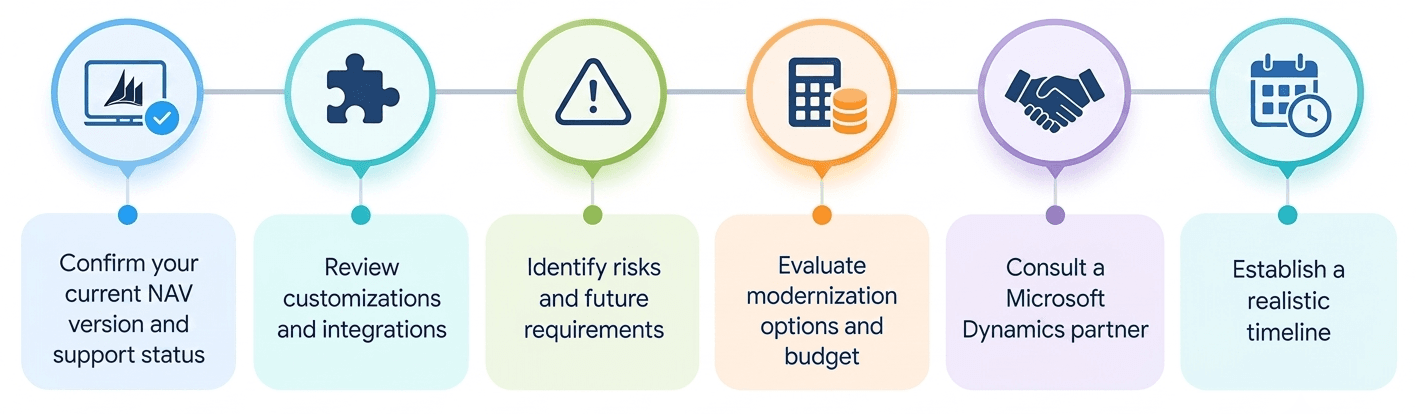
Use this checklist to guide your planning:
Confirm your current NAV version and support status
Verify which version your organization is using and review its applicable Microsoft support timeline.
Review customizations and integrations
Document existing customizations, third-party applications, integrations, and business-critical processes that depend on NAV.
Identify risks and future requirements
Assess potential security, compatibility, maintenance, and operational challenges while identifying the capabilities your business will need in the future.
Evaluate modernization options and budget
Compare continued use with appropriate risk controls, Dynamics 365 Business Central, and other suitable ERP solutions. Consider licensing, implementation, infrastructure, and ongoing maintenance costs.
Consult a Microsoft Dynamics partner
Seek expert guidance to assess your current environment, understand potential modernization approaches, and identify key dependencies.
Establish a realistic timeline
Set milestones for assessment, decision-making, budgeting, and implementation planning well before your support deadline.
Taking these steps early can help your organization avoid rushed decisions and prepare for a smoother transition when the time comes. The goal is not simply to replace an older ERP system, but to choose a solution that supports your business processes, technology needs, and long-term growth.
Conclusion
Businesses should start evaluating their ERP strategy well in advance. Although the software will not automatically stop working after this date, the end of support can create additional security, compatibility, and maintenance challenges.
Assessing your current NAV environment, reviewing business requirements, and comparing modernization options can help you make an informed decision. Whether you choose Dynamics 365 Business Central or another ERP solution, early planning can help reduce disruption and align your technology investment with long-term business goals.
Frequently Asked Questions (FAQs)
Microsoft Dynamics NAV 2018 extended support ends on January 11, 2028. Mainstream support ended on January 10, 2023. Businesses should assess their ERP modernization options before the extended support deadline.
Yes. As of October 2026, Dynamics NAV 2018 remains within its extended support period. Mainstream support has ended, and extended support is scheduled to end in January 11, 2028. The available support benefits are more limited than during mainstream support.
No. Dynamics NAV 2018 will not automatically stop working after support ends. However, Microsoft support and regular security updates will end, potentially increasing security, compatibility, and maintenance risks.
Businesses can evaluate Dynamics 365 Business Central, consider another suitable ERP platform, or continue using NAV with appropriate risk controls for a limited period. The right choice depends on existing customizations, business processes, budget, and future requirements.
Yes. Dynamics 365 Business Central is the modern successor to Dynamics NAV and offers cloud and on-premises deployment options. However, moving from NAV may require reviewing customizations, integrations, and data requirements before choosing the right transition approach.
The cost depends on the complexity of the existing NAV environment, data volume, customizations, integrations, licensing, and implementation scope. Businesses should assess both upfront expenses and ongoing maintenance costs before finalizing a modernization budget.
Businesses should begin planning well before the January 2028 deadline. Starting early provides time to assess the existing system, compare ERP options, estimate costs, and establish a realistic implementation timeline without rushing critical decisions.
Dynamics NAV is a legacy ERP platform, while Business Central offers a more modern platform with cloud deployment options, regular product updates, and evolving integration and automation capabilities. The suitability of Business Central depends on each organization's operational and technical requirements.
Some customizations and integrations may be reusable or adaptable, while others may need to be redesigned. A technical assessment can help identify dependencies, evaluate compatibility, and determine the effort required for the transition.
Businesses should assess a partner's Microsoft Dynamics expertise, relevant implementation experience, integration capabilities, understanding of legacy systems, and approach to project planning and risk management. Clear communication, transparent cost estimates, and ongoing support are also important considerations.
Table of Contents
- Microsoft Dynamics NAV 2018 has helped businesses
- Key Takeaways
- When Is Dynamics NAV 2018 End of Support?
- What Does Dynamics NAV 2018 End of Support Mean for Your Business?
- Risks of Continuing to Use Dynamics NAV 2018
- What Are Your Options Before Dynamics NAV 2018 Support Ends?
- Dynamics NAV 2018 vs. Dynamics 365 Business Central
- How Synoverge Helps Businesses Modernize Microsoft Dynamics NAV
- Dynamics NAV 2018 End of Support: Your Next-Step Checklist
- Conclusion
- Frequently Asked Questions (FAQs)


Planning Your Next Step Beyond Dynamics NAV?
Explore modern ERP solutions with our Dynamics experts.
Contact UsRelated Blogs

Software Development, Artificial Intelligence
Why AI Projects Fail: 9 Reasons & How to Ensure Success
By Ritesh Dave 16 Jul, 2026
Discover why AI projects fail, the biggest implementation challenges, and proven strategies organizations use to achieve successful AI adoption and measurable ROI.


Software Development, Artificial Intelligence
AI Orchestration for Legacy System Modernization: A Complete Guide
By Ritesh Dave 31 Aug, 2026
Discover how AI orchestration accelerates legacy system modernization through intelligent automation, code transformation, and cloud-driven innovation.

Software Development
How to Select a Software Partner That Delivers
By Ritesh Dave February 14, 2025
For ISVs, Independent Software Consultants, and SMEs, selecting the right software development partner is critical for growth, innovation, and gaining a competitive edge. Partnering with the ideal development team can even yield cost savings of 60-70% on web development projects.